Help · Release music
When a person checks your release, and how to reply
Before a new release goes out, it passes safety checks, and a person may look at it first. When that happens, what each message means, how to answer a question or a refusal, and how the AI questions work.
Checked against the app on
Stores remove spam and charge distributors for fraud, so every new release passes some checks before it goes out. No check refuses anything by itself. A check can only send a release to a person, and a person can clear anything.
Only new releases are checked. Changes to a release that's already out, and takedowns, always go through.
When a person looks
| Your band | What happens |
|---|---|
| Its first 90 days | A person looks at every release. It's a quick look, and it doesn't mean anything is wrong. |
| After that | A person looks at one release in five, plus anything the checks flag. |
Automatic checks run on every release. If yours are clear and it isn't your band's turn, it goes straight on.
Send it for review
- Finish the wizard and open the Review step. Fix any blockers first: see Your first release.
- A panel near the top says A person looks at this before it goes out, and why.
- Press Send for review → at the bottom of the page.
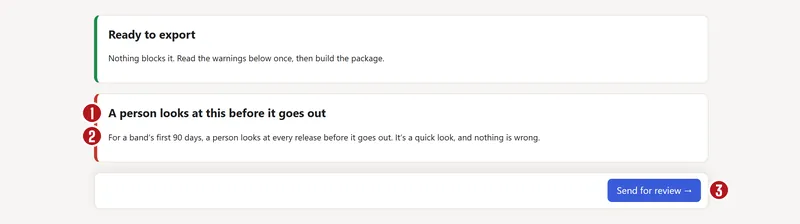

The panel changes to A person is checking this release. There's nothing you need to do yet. You'll hear within 3 working days, by bell and email. The band's owners and label managers are told, and so is whoever pressed the button.
While you wait, or after it's cleared, a person's look covers this version of the release. Changing the audio, the cover, a title, the artist, the label, the credits, a track's song or an AI answer sends it back to the start. The release date, territories, stores and splits aren't part of it, so you can change those.
What can happen next
| The page says | What it means | What to do |
|---|---|---|
| Cleared by a person | It can go. | Press Build the package → on the Review step. |
| A person has a question | It can go once this is answered. | Reply. |
| This release wasn't accepted | It can't go out as it is. The reviewer's words say why. | Reply if something's been misread, or change the release and send it again. |
On a refused release the button says Not accepted until something changes. Reply, or change the release.
Reply to a question or a refusal
- Open the link in the email or the bell. It goes to the release's Review step.
- Read the reviewer's message. Earlier messages stay on the page, with who wrote them.
- Type your answer under Your reply and press Send reply.
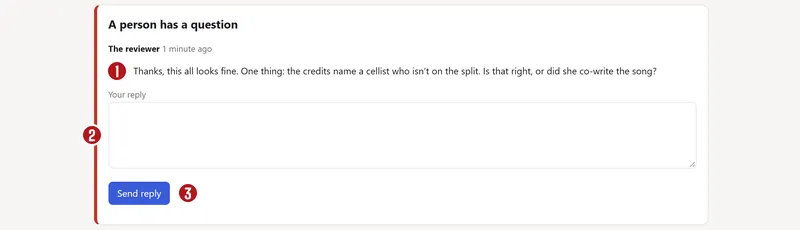

Your reply goes back to the person, and the page says A person is checking this release again.
If it's waiting for the splits
Send waits until every writer on the release has approved their split. The panel says Send opens when this is done and names who hasn't approved yet, and the button says Waiting for the splits. See approving splits.
Stuck, like a writer you can't reach? Press Ask a person in that panel, and a person will look at it.
What the checks look for
The panel says what it found in plain words. A flagged release goes to a person, who usually clears it or asks you one question.
| What it found | What to do |
|---|---|
| A track marked as made entirely by AI | If people played or sang it, change the answer on the Tracks step. Otherwise a person replies. |
| An AI voice that sounds like a real person | You need their written permission. A person will ask for it. |
| A file name that mentions an AI music tool, with little or no AI in your answer | A person will check with you. An honest mistake is simple to fix. |
| The same audio as another of your tracks | If it's the same recording, add it with that track's ISRC. If it's different, a person confirms that and clears it. |
| Audio that matches another account's recording | A person checks whose it is. |
| An ISRC or UPC another account already uses | A person checks it with you. If you're moving this music from another distributor, say so. |
| A release that's mostly tracks under 60 seconds | A person takes a quick look. A real record of short songs is fine. |
| Many tracks of nearly the same length | A person takes a quick look. Stores look for this in mass uploads. |
| A name or title that reads like search keywords | If it really is the title, a person clears it. Otherwise, rename it. |
| An artist name another account uses, or a store page linked to another account | A person checks it's you, so your music can't land on someone else's page. |
| A store that already has an artist with your name | A person checks with you. If it's yours they link it, and if it isn't they work out how to keep your releases apart. |
One short track on its own is fine. It's usually an interlude or a skit: the reviewer gets a note, and nothing stops. (TikTok still rejects tracks under a minute: see the audio checks.)
The AI questions
Stores now ask for this, and we pass your answers on. You answer on the Tracks step, for each track's audio (what you hear) and its song (the music and lyrics), and on the Artwork step for the cover. Each one is required: No, A little, A lot or All of it. Ordinary tools like tuning, noise removal or a mastering plug-in don't count.
| Your answer | What happens |
|---|---|
| No, or A little | Nothing extra. |
| A lot, on the audio | Welcome, but it can't use YouTube Content ID or Meta Rights Manager: those need exclusive rights to the audio. |
| All of it, on the audio | A person looks. We don't send tracks that no person made. |
| All of it, on the song, with real people playing and singing it | Accepted. The reviewer gets a note and checks that the credits name real players. |
| All of it, on the cover | Accepted. The reviewer gets a note and checks it's free of other people's logos and likenesses. |
The Tracks step also has a tick box: It uses an AI voice that sounds like a real person. That's never allowed without that person's written permission.
Got an answer wrong? Change it. An honest mistake gets fixed. Deliberately hiding heavy AI use breaks the terms.
Questions
Does a review mean something is wrong?
No. In a band's first 90 days, a person looks at every release, and after that, one in five comes up in turn. The panel says “nothing is wrong” when that's the reason.
How long does a review take?
You'll hear within 3 working days, by bell and email. Leave time for it: pick a release date at least three weeks away.
Who is the reviewer?
A person at Split n Spin. During the beta, that's Jay.
Can I change the release date while it's waiting?
Yes. The date, territories and stores aren't part of the review. Changing the audio, the cover, a title, the artist, the label, the credits, a track's song or an AI answer means it needs a new look.
I used AI to write the lyrics, and we played and sang it ourselves. Is that OK?
Yes. Say so on the Tracks step: the song's answer is A lot or All of it, and the audio's answer is what you actually did. A song AI wrote that people performed is accepted.
Can my band's other members see the review?
Anyone who can open the release's Review step sees the panel and the messages. The emails go to the owners, the label managers and whoever pressed the button.
About the picturesThey show Copper Kettle, the made-up band from our guide. Every name, code and dollar in them is invented. Numbered red dots on a picture match the numbered steps.