Help · Account and help
Your account, your data, and leaving
Change your password, choose which emails you get, what the app keeps about you and your band, and how to leave with your music and its codes. Plus what isn’t a button in the app yet.
Checked against the app on
Your password
To change it, click your name at the top of any page. Type your current password and the new one twice (12 or more characters), then press Change password. You stay signed in here; every other browser is signed out.
If you've forgotten it, press Forgot your password? on the sign-in page, type your email and press Send the link. The link works for 60 minutes. Setting a new password signs out every device.
After 5 wrong tries in a minute, sign-in pauses for a minute. There's no two-step sign-in yet.
Choose which emails you get
Open the bell at the top right, then Choose what you get. For each kind of message, pick Email + bell, Bell only or Off. Your choices apply in every band you're in.
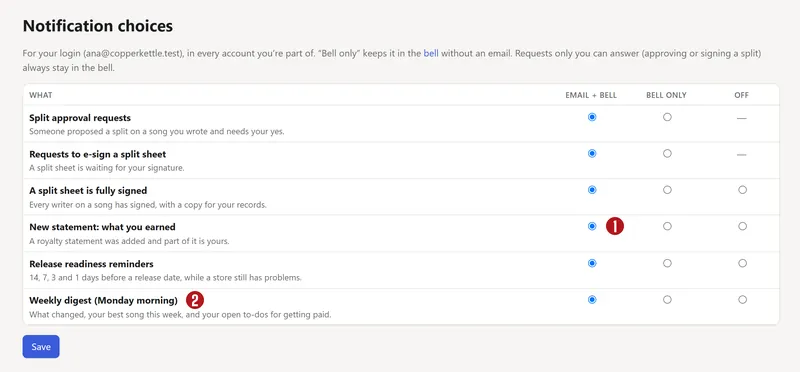

| Message | Can be turned off? |
|---|---|
| A split sheet is fully signed | Yes |
| New statement: what you earned | Yes |
| Release readiness reminders (14, 7, 3 and 1 day before) | Yes |
| Weekly digest, Monday morning | Yes |
| A split is waiting for your approval | Bell at least |
| A split sheet to e-sign | Bell at least |
| A reply to your feedback | Bell at least |
Invites and password resets are always sent. Every email has an unsubscribe link at the bottom: it asks first, then moves that kind of message to the bell only, or every kind with Stop every email.
What the app keeps
About you:
- your login: name, email, and when you last signed in
- your person record: legal name, IPI, ISNI, other names you go by, and payout email and note
- your memberships of BMI, ASCAP, The MLC and SoundExchange, with member numbers
- each split answer and signature, with its time, IP address and device
- a log of who changed what, and sign-ins, with IP address and device
- your notification choices, and any feedback you send (with its screenshot, if you add one)
About the band: releases, recordings, songs, splits, statements and the files you upload. For the Band plan, Stripe's customer number (never your card) and whether the identity check passed (never the ID itself).
Nothing is sold or shared for advertising. The app has no trackers. Your bandmates see the band's catalog, and the money they're allowed to see by their role.
Leave, and take your music
Your releases' codes are yours. Every ISRC and UPC is on each release page, and the delivery package from the wizard holds every field and file. A new distributor can deliver the same releases with the same codes, and your play counts follow; see Moving distributors. The terms will promise a full export if Split n Spin ever closes.
To have everything we keep about you deleted, see Delete your data, or email [email protected].
Your payout details
On My page, Update details holds the payout email for your share of the band's distributor money, and an optional note (for example, PayPal). The app shows who's owed what, but it doesn't pay anyone yet.
Questions
How do I leave and take my music?
Your releases' ISRCs and UPCs are on every release page; give them to your next distributor, so it sends the same releases with the same codes and your play counts carry over. Keep the releases up here until the new copies are live. Then email us to close the account.
Can I delete my account?
Not from a button yet. Email us from the address you sign in with, and we'll delete it and confirm. If the band has releases in stores, tell us whether to take them down or keep them up while you move them.
Who can see my legal name and IPI?
The band's owners and label managers, and anyone you send a split sheet to: they appear on the sheet, because PROs need them to pay you.
I'm getting too many emails.
Open the bell → Choose what you get, and set anything to Bell only or Off. The weekly digest is the easiest one to turn off.
About the picturesThey show Copper Kettle, the made-up band from our guide. Every name, code and dollar in them is invented. Numbered red dots on a picture match the numbered steps.