Help · Splits and money
Analytics and listener data from Spotify and Apple
Analytics shows money and plays by month, country and store, from your statements. How to download your listener numbers from Spotify for Artists and Apple Music for Artists and bring them in, and what the stats cards are.
Checked against the app on
Analytics shows what your music earned and how often it played, from the statements you've imported. Listener data adds what only Spotify and Apple can tell you: listeners, followers, saves, playlists and cities.
Read Analytics
Open Analytics. Everyone can see it except viewers; artists see their own artist names, and contributors see their own numbers on their home page instead.
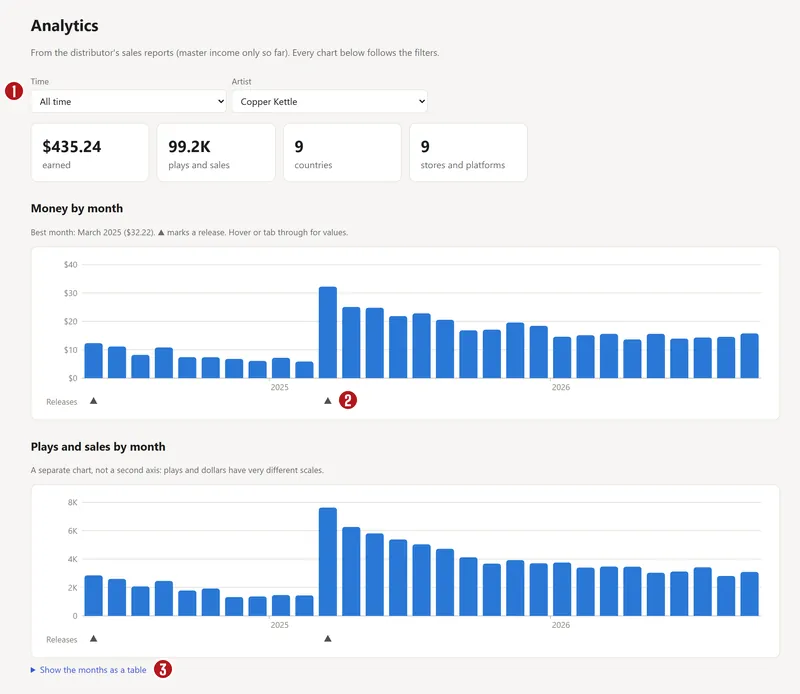

- Filters: All time, Last 3 years or Last 12 months, counted back from your latest statement, not from today; and one artist or all.
- Money by month and Plays and sales by month: two separate charts, with ▲ under each month a release came out, so you can see what each release did.
- Where it's heard: a world map shaded by money per country. Grey means nothing was reported there.
- Store mix: money by store, and pay per 1,000 plays by store. Only streams count towards that rate (downloads are sales), and stores with fewer than 100 plays are left out.
Every chart has a Show … as a table link, for screen readers and for copying the numbers.
Bring in listener data
Spotify and Apple don't share listener numbers with distributors, so you download them from their artist dashboards and bring them in. Use a computer: the phone apps have no download buttons.
From Spotify for Artists
- Open artists.spotify.com, sign in, and pick the artist at the top left.
- Audience timeline: click Audience, set the range to Last 12 months the first time (Last 28 days after that), then the download icon beside the chart.
- Songs: Music → Songs → Last 28 days → the download icon above the table. The file doesn't say which range it covers, so note it.
- Playlists: Music → Playlists → Last 28 days → download.
- One song's streams by day: Music → Songs → the song → download beside its chart.
- Don't rename the files, or put the range in the name, like
songs-28days.csv.
From Apple Music for Artists
- Open artists.apple.com and pick the artist.
- Set the date range first, at the top right. Apple's numbers are in UTC (London winter time), and new days take up to 48 hours to appear.
- Music → See All → download: plays, average daily listeners and Shazams per song.
- Audience (or Overview): the download button on the cities and countries tables, where there is one.
Import the files
- Open Analytics → Import listener data.
- Choose the files: several at once is fine (up to 20, CSV or .xlsx).
- Artist: leave it on From the file name, or pick one.
- If a file is for one song, or doesn't say its dates, open The file is for one song, or it doesn't say its dates? and pick the range you chose on the dashboard, or the song.
- Press Import.
Without a range, the app reads it from the file name, or assumes the last 28 days and says so. Importing the same export again replaces the earlier copy, so download as often as you like. Remove on the Imported list deletes one file's numbers.
Songs are matched to your recordings by ISRC, then by title with its version, then by the bare title. A song that doesn't match shows as “not matched to a recording”.
No download button?
Some tables, like Spotify's locations and Source of streams, have no download. Type the numbers into a spreadsheet under a header row like city,region,country,listeners or source,streams,percent, save it as CSV, and import that.
What the Listeners page shows
- Listeners a day and streams over the last 28 days, each against the 28 days before; followers; and countries with listeners. Spotify and Apple counts are added together.
- What changed this month: streams, listeners, new followers, playlist adds and the top city. The same lines go into the Monday digest email, never with money in it.
- Charts of listeners, followers, and streams on the dashboards against plays on your statements.
- Where listeners are and Where listeners come from, including playlist streams by who made the playlist.
- Saves rate by song (Spotify only; songs under 50 listeners are left out).
Stats cards
Under Stats cards, make a square post (1080 × 1080) and a story (1080 × 1920) from your numbers: This month, Top city, Release-week recap or Year in review. Press Make card, check the preview, then Approve and Download. Money only goes on a card if you tick the box for it.
YouTube channels
Under Statements → YouTube channels, a manager can connect the band's channel with read-only access (nothing is posted or changed). The app then pulls each video's views, hours watched and, on monetised channels, revenue every night, matched to your tracks.
Questions
Why don't my numbers match Spotify for Artists?
Analytics counts plays on statements, which arrive one to three months late and only count plays that paid. Spotify for Artists counts every stream, the next day. The Listeners page shows both side by side under Streams: dashboards and statements.
How often should I import listener data?
Once a month is plenty: download the last 28 days on the same day each month. Importing again replaces the older copy, so there's no harm in doing it more.
Can my bandmates see the listener numbers?
Owners, managers and the band's artist logins can. Contributors see their own songs' numbers on their home page.
About the picturesThey show Copper Kettle, the made-up band from our guide. Every name, code and dollar in them is invented. Numbered red dots on a picture match the numbered steps.