Help · Release music
Store fields and previews: why each store differs
One master record for the release, plus only what each store does differently. How the store grid works, how each store writes titles, what the readiness cards check, and when to override a blocker.
Checked against the app on
Every store takes the same release but files it a little differently. Apple puts featured artists in the title; Spotify puts them in the artist line. TikTok rejects a song under 60 seconds; Deezer refuses a track without an explicit flag. You fill in one master record, and change a field for one store only where that store needs it.
The store grid
Open a release and press Open the store grid (or Store grid on the Releases list). Rows are fields; columns are Spotify, Apple, YouTube, TikTok, Meta (Instagram and Facebook), Amazon, Deezer and Tidal.
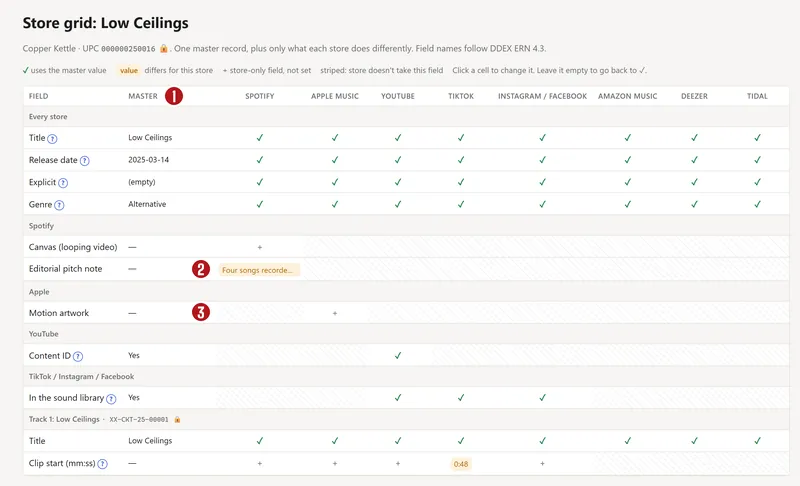

- ✓ uses the master value.
- A highlighted value is different for that store.
- + is a store-only field that isn't set yet.
- Striped means the store doesn't take that field.
To change a field for one store, click its cell, choose Same as master or type the value, add a reason under Why (optional) if it helps your bandmates, and press Save. Setting it back to the master value removes the difference.
Owners and label managers can edit every release; artists can edit their own. Everyone else sees the grid read-only.
Fields only some stores have
- Spotify: Editorial pitch note and Canvas (the short looping video behind a song).
- Apple Music: Motion artwork and Apple Digital Masters.
- YouTube: Content ID (on by default; it finds your recording in other people's videos), the official video link, and the owning channel, which merges your topic channel with your own.
- TikTok, Instagram and YouTube Shorts: In the sound library (on by default) and the clip start for each track.
- Hi-res and Atmos: a 24-bit master for Apple, Amazon, Tidal and Deezer; a Dolby Atmos mix for Apple, Amazon and Tidal.
Deliver here is a field like any other. Set it to No to skip a store for this release.
How each store writes a title
Type the title, version and featured artists in their own boxes, never all in the title. Each store then writes them its own way:
| Store | How “Night Bus Home”, version “Acoustic”, featuring Lee shows |
|---|---|
| Spotify | Night Bus Home - Acoustic · artist: Copper Kettle, Lee |
| Apple Music | Night Bus Home (Acoustic) (feat. Lee) · and “ - Single” on a single |
| YouTube Music | Night Bus Home (Acoustic) · artist: Copper Kettle & Lee |
| TikTok | Night Bus Home (Acoustic) · artist: Copper Kettle, Lee |
The readiness cards
Each release page, the store grid and the wizard show one card per store, checked against that store's own published rules. A card says Ready, Needs a look, Blocked, Overridden or Not delivered (when Deliver here is No).
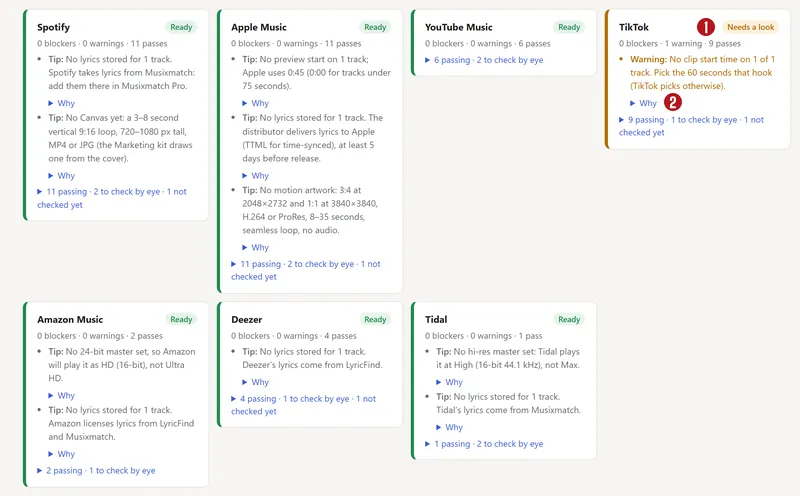

Each problem is one of:
- Blocker: the store would reject it. Delivery stops until it's fixed.
- Warning: the store might push back, or it looks wrong.
- Tip: worth doing, like adding lyrics or a Canvas.
- Look yourself (👁): something only a person can judge, like whether the cover has a web address on it.
Every problem has a Why that quotes the rule, links to the store's page, and gives the date we last checked it. A rule that only a distributor publishes, not the store itself, says so.
Rules that differ by store
| Rule | Where it differs |
|---|---|
| Cover size | Spotify 640–10,000 px; Apple at least 1400; YouTube 1400–4098; TikTok 1600–6000 and under 10 MB; Deezer 500–4096. 3000 × 3000 fits them all. |
| Cover format | Spotify takes TIFF; Apple, YouTube, TikTok and Deezer only JPG or PNG. |
| “feat.” in the title | A blocker on Spotify and TikTok. Apple allows only “(feat. X)” or “(with X)”, in lower case. |
| ALL CAPS or all lower case | A warning on Spotify and Apple, a blocker on TikTok. |
| No explicit flag | A blocker on Deezer, a warning elsewhere. |
| No writer on a track | A blocker on Deezer, a warning on Apple. |
| Under 60 seconds | A blocker on TikTok only. |
| Versions | Spotify blocks brackets in the version box (write 2011 Remaster, not (2011 Remaster)) and “Original Mix”; TikTok blocks “Original” and “Official”. |
| Clip start | Missing is a TikTok warning; Apple uses 0:45 when none is set. |
| Covers and samples | YouTube blocks a cover song while Content ID is on. |
The store preview
Under the cards, the preview draws the release the way Spotify, Apple Music, YouTube Music and TikTok lay it out, so a wrong title or a missing version shows up before release day. Flip between stores with the tabs.
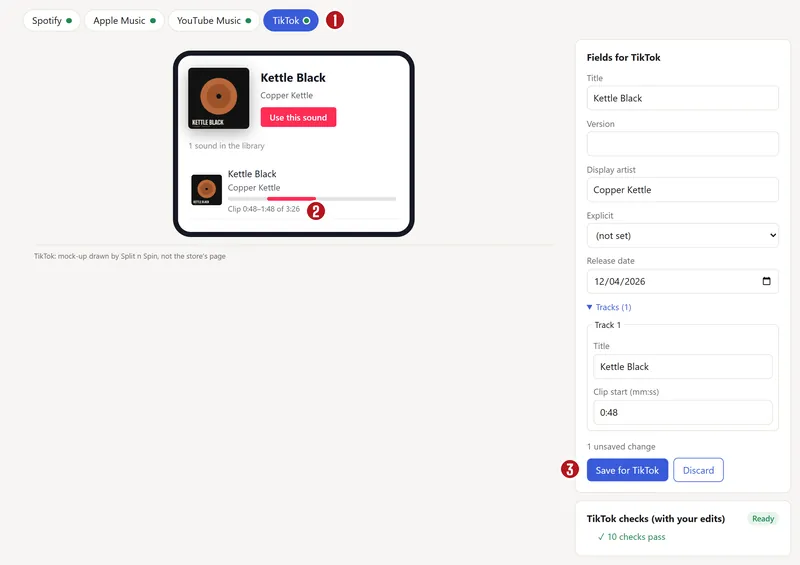

The side form, Fields for a store, lets you try a different title, version, artist, explicit flag, date or clip start. The drawing and that store's checks update as you type, but nothing is saved until you press Save for that store. Discard drops the changes.
These drawings are ours, not the stores' pages; each one says so, and none uses a store's logo.
Overriding a blocker
Sometimes a rule doesn't fit, for example a band name that is really written in all capitals. Owners and label managers can ship anyway:
- On the release page, open Override… on that store's card.
- Say why, in 5 to 300 characters. The reason stays with the release.
- Press Ship anyway.
The card then says Overridden, with your reason. The override covers only the blockers there at that moment: a new one blocks again. Remove override takes it back. The store can still reject the release, so override only when you're sure.
Questions
Why does Apple show my title differently from Spotify?
Each store has its own style rules. Apple puts featured artists and “- Single” or “- EP” in the title; Spotify puts featured artists in the artist line and joins the version with a dash. Type each part in its own box and every store gets it right.
What does “Blocked” mean for my release?
That store's rules say it would reject the release as it is. The release can't be delivered to that store until you fix the problem, set Deliver here to No for that store, or an owner overrides it.
Can I send a store a different title?
Yes. Click the Title cell in that store's column of the grid, or use the preview's side form and Save for that store. Use it sparingly: a title that differs between stores can split a song's links and search results.
About the picturesThey show Copper Kettle, the made-up band from our guide. Every name, code and dollar in them is invented. Numbered red dots on a picture match the numbered steps.