Help · Set up your band
Bring your catalog from DistroKid, TuneCore or CD Baby
Bring the releases you already have, with every ISRC and UPC exactly as the stores know them. Which file to download from your distributor, how the review works, and what gets saved.
Checked against the app on
Your releases already have an ISRC per recording and a UPC per release. The stores track play counts, playlists and money by those codes. The importer brings each release across with its codes copied exactly, so nothing starts again from zero.
Owners and label managers can import. It works on the free Learn plan too.
Get the right file from your distributor
None of the distributors offers a catalog download. Their sales reports do list every UPC and ISRC that earned something, so that's the file to use. The importer shows these same steps under Where to get your file.
DistroKid
- Sign in at distrokid.com and open Bank.
- Click See excruciating detail.
- Click Download, to the right of Display. A very big report (over 50,000 lines) is built for you and kept for 7 days.
- Upload it as it is. It holds every sale, so it brings your earnings history too.
TuneCore
- Open Money & Analytics → Sales Report.
- Set the dates to cover everything you've ever released.
- Click Download This Report.
TuneCore's report doesn't carry ISRCs unless you brought your own codes, so the importer looks them up on Deezer.
CD Baby
- Sign in at members.cdbaby.com and open Sales & Reports → Sales and accounting.
- Click Downloads, then Sales Reports.
- Download Digital Distribution Details for all dates.
Anywhere else, or no file at all
Copy the UPC from each release's page at your distributor and paste them in. You can also paste Spotify, Apple Music or Deezer album links, or fill in our spreadsheet: Download the template (CSV), one row per track, with the UPC and ISRC columns formatted as Text first so the spreadsheet doesn't turn the codes into numbers.
Read your catalog
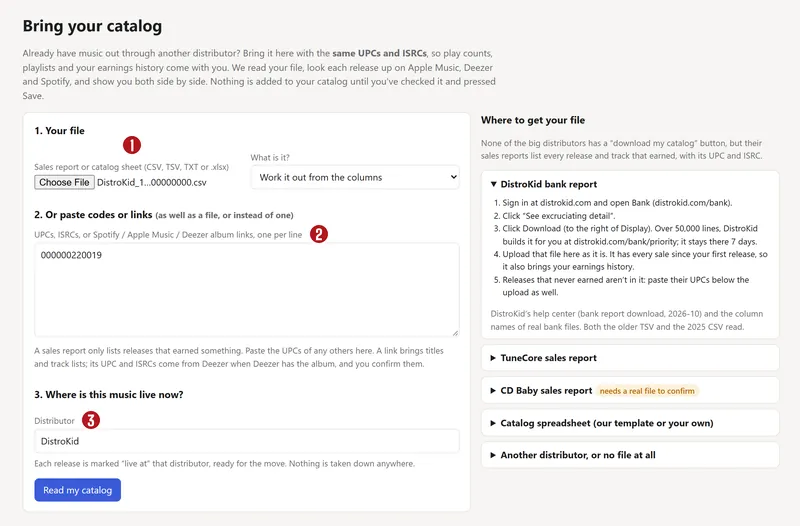

- Open Import, or press Bring your catalog on the Releases page.
- Your file: choose the sales report or spreadsheet (CSV, TSV, TXT or .xlsx, up to 50 MB and 400 releases). Leave What is it? on Work it out from the columns unless it guesses wrong.
- Or paste codes or links: a sales report lists only releases that earned something. Paste the UPCs of any others here, one per line.
- Where is this music live now?: pick your distributor. Nothing is taken down anywhere.
- Press Read my catalog.
The importer then looks each release up on Apple Music, Deezer and Spotify for titles, dates, track order and missing ISRCs. Apple allows about 20 lookups a minute, so a big catalog takes a few minutes. Leave the page open.
Check each release
Review your catalog shows every release as a card with three columns: From your file, From the stores and What will be saved. Each value is tagged with where it came from.
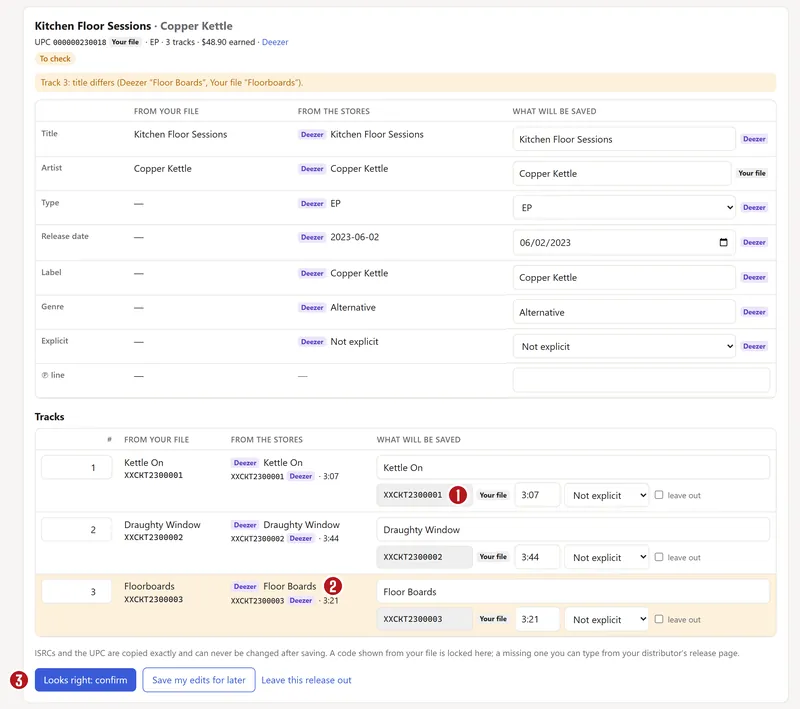

- If the file and the stores agree on everything, the bulk button Confirm the N releases where your file and the stores agree does them all at once.
- Otherwise open each card in To check, fix what's wrong, and press Looks right: confirm. Leave this release out skips one; the leave out box skips one track.
- Codes from your file are greyed out: they can't be edited, because they're what the stores know. If a code is missing, type it from your distributor's release page.
Some things stop a release until you fix them:
- No UPC.
- A track with no ISRC. A new code would start its play count again at zero, so find the old one.
- Two different ISRCs for one track. Pick the one your distributor shows.
- An invalid ISRC, or a release with no tracks.
A UPC that a spreadsheet turned into something like 8.82459E+11 is refused rather than guessed: export the file again with that column as text.
Save it
Press Save N releases. The importer saves each release, its recordings and songs, with every code exactly as it is in the stores. It marks each release as live at your old distributor, and loads the file's sales lines as earnings history, so past money lands on the right song.
A release whose UPC is already in your catalog isn't copied twice: it's linked, and only its empty fields are filled in.
When it's done, upload the original cover for each release: the covers found in the stores are kept for reference only. Then add splits for each song, and, if you're moving, Plan the move → opens the migration tracker.
Questions
Can I keep my ISRCs and UPCs?
Yes, and the importer insists on it. Codes are copied exactly, apart from spaces and dashes, and once saved they're locked for good. Keeping them is what keeps your play counts, playlists and earnings history attached to your songs. See ISRC, UPC, ISWC and IPI, explained.
Does importing take my music down from DistroKid?
No. Importing only copies the details into Split n Spin. Your releases stay live where they are until you move them, release by release. See Moving off another distributor.
Some releases are missing from my report.
Sales reports only list releases that have earned something. Paste the missing releases' UPCs, or their Spotify or Apple Music links, in the second box.
Will my old earnings show up?
From DistroKid, TuneCore and CD Baby reports, yes: every line is matched to its recording by ISRC and shows on the Money Map and Analytics. A pasted code or the template brings the catalog only, with no earnings.
About the picturesThey show Copper Kettle, the made-up band from our guide. Every name, code and dollar in them is invented. Numbered red dots on a picture match the numbered steps.