Help · Promote it
Marketing kit, release planner and pitches
A link page for every release, artwork in four sizes, a week of draft posts you approve one by one, a release plan with 16 dated tasks, a press kit, and pitches for Spotify editors, curators, press and radio. Nothing posts or sends by itself.
Checked against the app on
The marketing kit is part of the Band plan. Owners, label managers and artists can use it. One rule runs through all of it: nothing posts or sends by itself. You approve each post, then copy it and post it by hand; you send each pitch yourself.
The marketing kit for a release
Open a release and press Marketing kit.
The link page
Every release gets a public page with its cover, title and a button for each store. Before release day it says Coming with the date and shows a Pre-save button; after, it shows Play and Buy buttons and 30-second previews of each track. It has no trackers and no cookies.
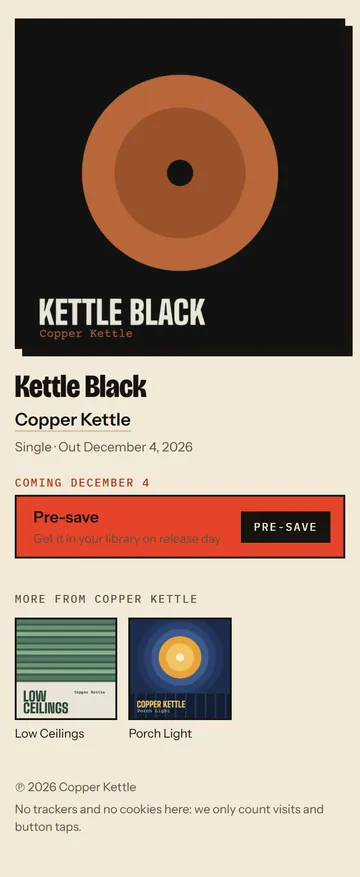

- Under Listen links, press Look up by UPC to find the Apple Music, iTunes and Deezer links, or paste links by hand. Pasted links are never overwritten.
- Paste your Pre-save page address (from Spotify's Countdown Page or a pre-save service). Until it's set, the button says the pre-save opens soon.
- Press Save links, then Copy link and share it.
The kit counts views, listen taps and pre-save taps, by store and by where people came from: add ?s=ig, tt, yt or fb to the link you post on each platform. Nothing about the visitor is kept.
Artwork
Four images from your cover, each with a Download button: a post (1080 × 1080), a story or reel cover (1080 × 1920), a YouTube thumbnail (1280 × 720), and a Canvas starter frame (1080 × 1920, no text). Pick the line above the title for the post and story.
A week of posts
- Under Release week, check the release day, and say in a line or two what the posts should say and how the band talks.
- Press Plan the release week. That drafts 20 posts: five moments (announce two weeks before, pre-save a week before, release day, three days after, and a week after) on Instagram, TikTok, YouTube and Facebook.
- On each post, edit the caption, press Save, then Approve.
- Once approved: Copy caption, Download image, post it on the platform yourself, and press I posted it.
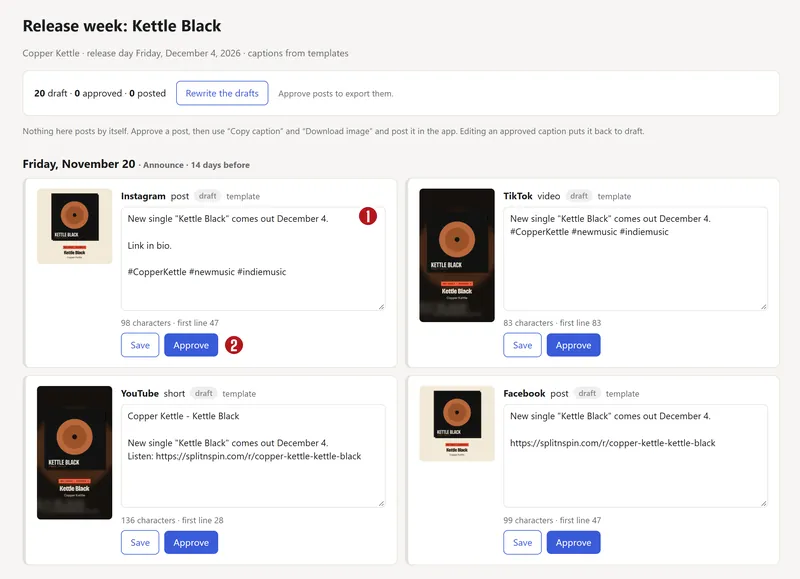

Editing an approved caption puts it back to draft. Download approved posts (.zip) gets every approved image and caption, with a schedule. Plan again redrafts the rest and keeps what you've approved.
Captions are drafted by Claude, an AI model, when it's switched on; otherwise from templates. Either way they're drafts for you to rewrite.
The release planner
Planner shows every upcoming release on a calendar, with the next two weeks' tasks. Each release's Release plan has 16 tasks dated from release day:
| When | Task |
|---|---|
| 6 weeks before | Masters final and through the audio checks · Cover final (3000 × 3000) · Press kit published · Start press outreach |
| 4 weeks before | Export the release · Every store's checks pass |
| 3 weeks before | Radio one-sheet and music to stations · Blog and review emails · Playlist curator emails · Pre-save link and Spotify Countdown Page |
| 15 days before | Release-week posts approved |
| 2 weeks before | Pitch the focus track to Spotify editors (at the latest 7 days before) |
| 10 days before | Canvas uploaded in Spotify for Artists |
| 1 week before | Lyrics delivered |
| Release day | Post and share the link page |
| 1 week after | Thank listeners and look at the numbers |
Many tasks tick themselves off when the app sees them done: the audio checks pass, the cover is the right size, the pitch is marked sent, the posts are approved. Mark the rest Done, or Not doing this one. Add a note, move a date, or Add a task of your own. Add to my calendar (.ics) puts the open tasks in your calendar app. Reminders arrive three days before a task is due and on the day, by email and in the bell.
The press kit
From Planner → Press kits, fill in the band's one-line description, genres in your own words, where you're based, a short bio (about 50 words) and a full one, notable facts, press quotes, links, a contact, and up to 12 photos with captions and credits. Photos under 2000 pixels are flagged as too small for print.
To publish, it needs a short bio, a photo and a contact, and the box Everything here is fine to be public ticked. It then has its own public page with every photo at full size and a zip of the whole kit. Unpublish takes it down.
Pitches
Each release's Pitches page has four drafts:
- Spotify editorial pitch: the same fields as Spotify for Artists' form: genres (up to 3), moods (up to 2), styles, instruments, and a description of up to 500 characters. Pitch at least 7 days before release; the card warns when that's passed.
- Playlist curator email and Blog and press email: a subject and a message.
- Radio one-sheet: a headline, about the record, “for fans of”, highlights, and an airplay note, as a one-page PDF.
Pick the focus track, press Draft it with Claude (or from the template), edit, Save and Approve. Approve stays off while a field is empty or over its length limit. Then Copy each field into Spotify for Artists or your email, send it yourself, and press I sent it. The AI is told never to invent quotes, reviews, influences or a backstory; check every line anyway.
Questions
Does the app post to Instagram or TikTok for me?
No. You approve each post, copy the caption, download the image and post it yourself. Posting straight from the app isn't switched on, and even when it is, nothing will go out without your approval.
Do I need a pre-save service?
No. Spotify's own Countdown Page (from Spotify for Artists) works as a pre-save. Paste its address into the link page's Pre-save page box.
Is the marketing kit free?
It's part of the Band plan ($36 a year for the whole band). The free Learn plan doesn't include it. See Billing and plans.
About the picturesThey show Copper Kettle, the made-up band from our guide. Every name, code and dollar in them is invented. Numbered red dots on a picture match the numbered steps.