Help · Splits and money
The Money Map: read it, fix red items, import statements
The Money Map shows the eight places a song earns, each as collected, in progress or leaking. What each status means, how to fix a red branch, and how to bring in statements from your distributor, BMI, The MLC and SoundExchange.
Checked against the app on
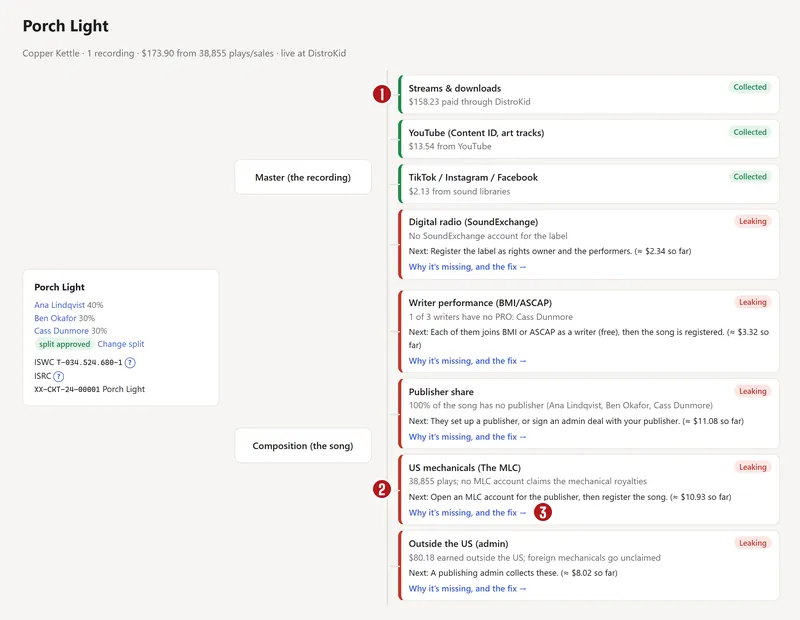
A released song earns in eight places. Four pay the recording and four pay the song itself (the words and music). Each comes through a different organisation, and each pays only people who signed up with it. The Money Map shows all eight for every song, so you can see what's coming in and what nobody is collecting.
Read a song's map
Open Money Map and pick a song.

| Branch | Pays | Collected through |
|---|---|---|
| Streams & downloads | the recording | your distributor |
| YouTube (Content ID, art tracks) | the recording | your distributor, or your channel |
| TikTok / Instagram / Facebook | the recording | your distributor |
| Digital radio | the recording | SoundExchange |
| Writer performance | the song | BMI or ASCAP (a PRO) |
| Publisher share | the song | a publisher, through the PRO |
| US mechanicals | the song | The MLC |
| Outside the US | the song | a publishing administrator |
Each branch has a status:
- Collected: statement lines for it have come in, with money.
- In progress: everything's signed up, and the money hasn't arrived yet. Most of these pay months after the plays.
- Leaking: the money exists, but nobody has signed up to collect it. Each leak says what to do next and roughly what it has missed so far.
- Not applicable: for example, the song isn't released yet.
Statuses come from real statement lines and from the accounts you've recorded, never from ticked boxes alone.
What “likely missed” means
The dollar figure on a leak is an estimate. Until your own statements come in, it uses industry averages: for example, US mechanicals at about 14% of a song's US store income, and performance royalties at about 7%. Once a branch has paid at least $1, the estimate switches to the ratio on your own statements. Treat it as a size, not a promise.
Fix a red branch
The Money Map page starts with What to fix, biggest money first: each fix once, with how many songs it covers and roughly what it's worth. A fix like “Register songs at The MLC” or “Cass joins a PRO” clears red on every song it touches.
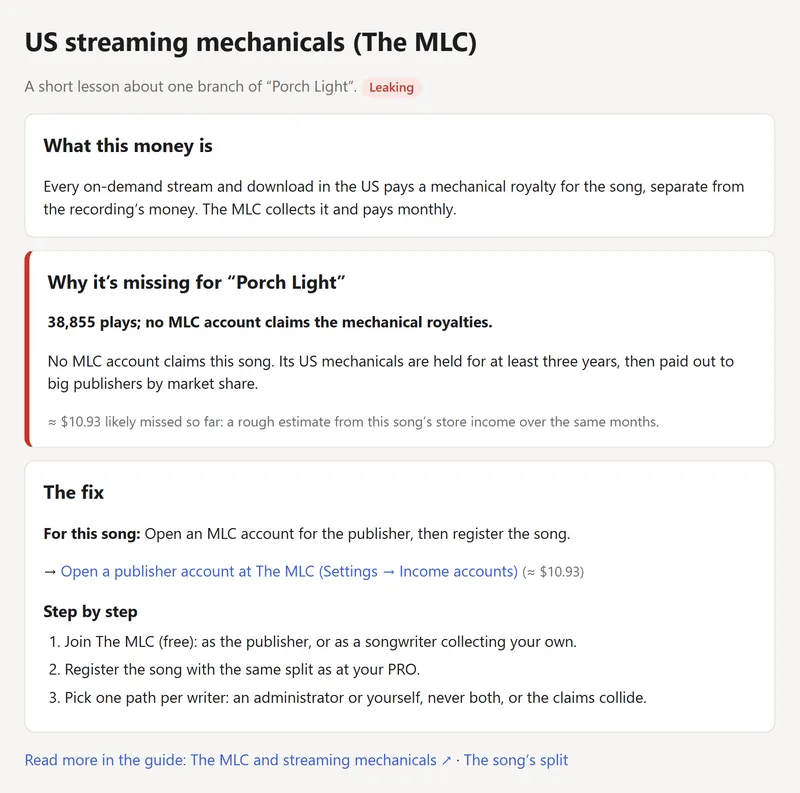
Press Why, and how to fix it (or a red dot) to open a short lesson: what this money is, why it's missing for this song, and the fix, step by step, with a link to the guide chapter.

Most fixes happen outside the app, at BMI, ASCAP, The MLC or SoundExchange. When you've done one, record it so the map knows:
- Your own memberships: on My page, in Your Get Paid path (below).
- The band's accounts: Settings → Income accounts, for BMI (writer and publisher), The MLC and SoundExchange (rights owner and featured artist). Set each to Applied or Active, with the member number.
Your Get Paid path
My page has seven steps for each person, each with why it matters, what it costs, and a link to sign up:
- Join a PRO as a songwriter
- Add your IPI number (your writer ID, from the PRO)
- A publisher for your share
- Join The MLC
- Register at SoundExchange as a performer
- Give the band your payout email
- Agree every split
Press I did this once you've applied, It's active now when it's confirmed, or I already have one if you were already a member. The path and the Money Map update straight away.
Import a statement
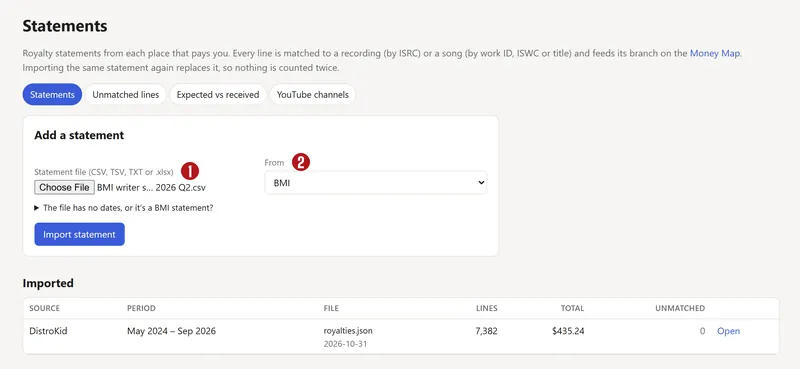
Statements are how money gets onto the map. Owners and label managers upload them under Statements.
- Download the statement from the source. Where to get each statement, on the same page, has the steps for each one.
- Press Add a statement and choose the file (CSV, TSV, TXT or .xlsx, up to 50 MB).
- Leave From on Work it out from the columns, or pick the source.
- For a file without dates, or a BMI statement, open The file has no dates, or it's a BMI statement? and fill in the months and whether it's a writer or publisher statement.
- Press Import statement.

| Source | Status |
|---|---|
| Our delivery partner’s monthly sales report | Layout confirmed |
| The MLC | Layout confirmed, from The MLC’s own layout sheets |
| BMI | Needs a real file to confirm |
| SoundExchange | Needs a real file to confirm |
| DistroKid, TuneCore, CD Baby | Coming with the catalog importer |
Importing the same statement twice replaces the first copy, so nothing is counted twice. Remove this statement takes one out, and the Money Map goes back to how it was.
Lines that didn't match
Each line is matched to a song or recording by its ISRC, then ISWC (the song's ID), then the society's own work number, then the title. Lines left over appear under Unmatched lines, biggest money first. Pick the right song from the list (or Another song…) and press Match. The app remembers it, for past and future statements from that source. Not ours (hide it) hides a line that isn't your music.
Expected vs received
This tab compares what each writer should have been paid, by your approved splits, with what the statements show, and flags shares that differ. It knows that PROs pay the writer's half and the publisher's half separately.
Questions
Why is a branch red?
Red means leaking: the song is earning in a way that nobody has signed up to collect. The usual reasons are a writer who isn't in a PRO, a song not registered with The MLC, or no SoundExchange account. Open the branch's lesson for the fix.
I signed up but it's still red.
Record it: on My page in your Get Paid path, or in Settings → Income accounts for the band's accounts. It turns amber (in progress) straight away, and green when the first statement from that source comes in, which can take months.
Does Split n Spin collect this money for us?
No. The app shows where every dollar comes from and what's leaking. The money comes to you from each organisation directly, once you've signed up with it.
Why is the map different from my distributor's dashboard?
The map shows only what's on statements you've imported, and statements arrive one to three months after the plays. A distributor's dashboard often shows early estimates.
About the picturesThey show Copper Kettle, the made-up band from our guide. Every name, code and dollar in them is invented. Numbered red dots on a picture match the numbered steps.