Help · Set up your band
Move from another distributor without losing play counts
Move your releases from DistroKid or another distributor one at a time, with the same codes, and take each one down only after the stores show the new copy with its play counts. The rules the app checks, and the order to do it in.
Checked against the app on
Stores recognise a release by its UPC and each recording by its ISRC. If the new distributor sends the same codes, the stores treat it as the same album: the play counts, playlist placements and saved-to-library counts stay. If a code changes, the store sees a new recording and its count starts again at zero.
So the move is simple to describe: send each release again with exactly the same codes, wait until the stores show the new copy, check the numbers, and only then take the old copy down.
Before you start
- Bring your catalog in, so every release has its UPC and every track its ISRC on file, locked.
- Make sure the details are right. A move is a good time to fix a misspelled title, but never a code. Changes to make during the move are listed on the Fixes page, and a release with a fix still on hold waits.
- Don't cancel your old distributor. Cancelling usually takes every release out of the stores at once.
The steps for each release
The Migration page lists every release and where it is:
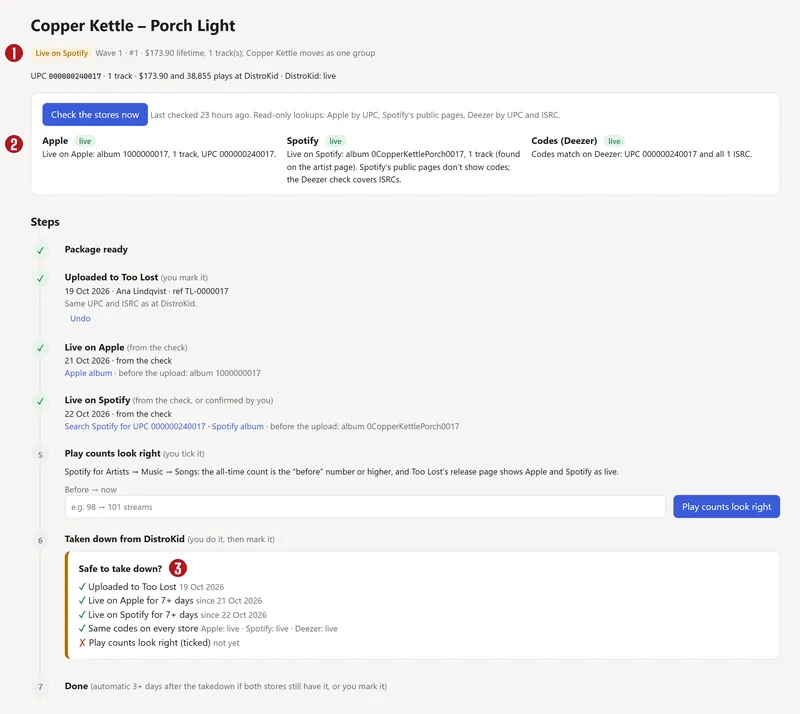

- Package ready: the release is built for the new distributor, with the same codes.
- Uploaded: you mark it once it's sent, with the date and the new distributor's reference.
- Live on Apple and Live on Spotify: the app checks the stores every day and ticks these itself. If Spotify can't be checked automatically, confirm it by hand with Confirm it's live on Spotify.
- Play counts confirmed: compare the count before and after, and press Play counts look right.
- Taken down at the old distributor: only once it's safe (below). Then mark it.
- Done: set by itself after 3 more days, if both stores still show the release.
If you mark a step by mistake, Undo takes back the latest one.
When it's safe to take the old copy down
The app only offers the takedown when all five of these are true:
- The new copy is uploaded.
- It has been live on Apple Music for 7 days or more.
- It has been live on Spotify for 7 days or more.
- The same codes are on every store: no store shows a mismatch, a missing track or a second copy of the release. Apple and Deezer are checked by UPC, and Deezer by every ISRC too.
- You've ticked Play counts look right.
Then, at DistroKid, open the release, check its UPC matches, press Edit release, then Remove this release from all stores. Check the stores again 3 to 7 days later.
Move in small waves
The tracker puts releases in waves of about 8, never more than 10:
- Wave 1 is one test release. Move it all the way through before anything else.
- Then one artist at a time, starting with the releases that earn least, so a mistake costs least.
- Releases with a fix on hold go last.
Work out the order again rebuilds the waves; a wave you set by hand stays where you put it.
Cancel the old distributor last
The cancel step stays locked until every release is Done: cancelling earlier would take the rest out of stores. Once it unlocks:
- Withdraw your balance.
- Download your last full sales report, and bring it in so the history stays on the Money Map.
- Turn off renewal.
- Keep the login, in case a store asks about an old release.
Questions
Will I lose my play counts?
Not if every code stays the same and you take the old copy down only after the new one is live and showing its counts. That's what the five checks are for. A changed ISRC or UPC is the one thing that resets a count, which is why codes are locked in Split n Spin once saved.
Will my songs disappear from playlists during the move?
For a short while a store can show two copies of the album; that's expected, and it's why you wait 7 days. Playlists point at recordings by ISRC, so with the same codes they follow the song to the new copy.
How long does a move take?
At least 7 days per wave after the stores show it, plus the time the new distributor takes to deliver. A catalog of 30 releases in 4 waves takes a few weeks. There's no rush: the old copy stays up the whole time.
Can I move from TuneCore or CD Baby too?
The rules are the same for any distributor. The tracker's takedown steps are written for DistroKid today.
About the picturesThey show Copper Kettle, the made-up band from our guide. Every name, code and dollar in them is invented. Numbered red dots on a picture match the numbered steps.